
The growing adoption of Computer-Based Test (CBT) platforms and online assessment software has become essential for coaching institutes to manage increasing student volumes, enable faster evaluations, and leverage data-driven insights. However, selecting the right CBT platform or online testing solution is critical. While the right system can enhance exam integrity, candidate performance, and operational efficiency, a poor choice can disrupt exams and impact outcomes. Therefore, institutes must evaluate online assessment platforms based on usability, scalability, and long-term value, starting with a clear understanding of their academic and operational requirements.
1. Recognizing the Testing Requirements
The first step in picking a CBT platform is to make sure you know exactly what you need to test. It’s hard to tell if a platform is really right for you without this clarity.
Different kinds of tests are given at different coaching centers. Some people rely heavily on objective tests, such as multiple-choice questions, which require rapid processing and assessment. Some answers are subjective or descriptive and need to be checked by hand or with AI. Some people use a mix of formats or even adaptive testing, which means that the level of difficulty changes based on how well the student does.
You need to make sure that the platform you choose can handle these formats without any problems. If it’s not flexible, your academic team will have to either lower the quality of the assessments or spend more time finding workarounds.
Size is another important factor. A platform that works well for a small group of students may not work well when thousands of students take a test at the same time. As your school grows, the platform should be able to handle more work without slowing down. If you don’t plan for scalability, your system could crash, slow down, or make students unhappy during high-stakes tests.
You should also think about how the test will be given. The platform must be able to support your operational setup, whether you give tests online, in computer labs, or in a mix of the two. For example, remote testing needs better monitoring tools, and offline environments may need synchronization tools.
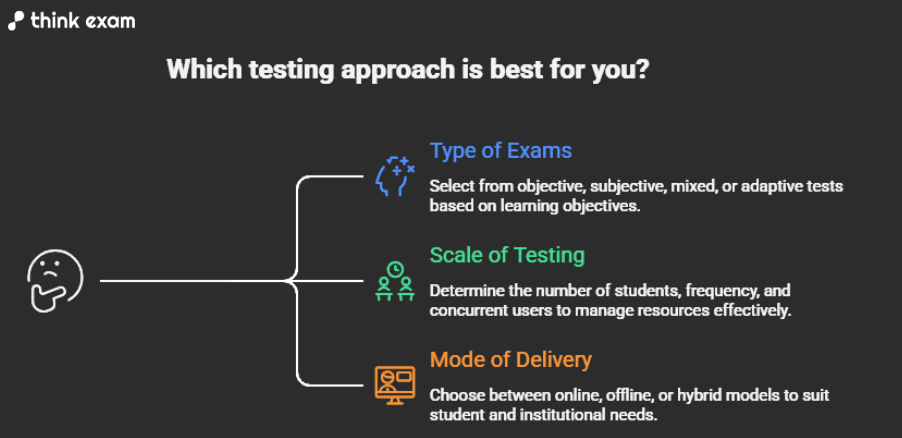
a. Type of Exams Conducted
- Objective tests (MCQs)
- Subjective/descriptive answers
- Mixed-format assessments
- Adaptive testing models
Different test formats require different technological capabilities. For instance, MCQ-based exams demand speed and instant evaluation, while descriptive tests require manual or AI-assisted grading systems. If your platform does not support your test formats effectively, it can limit your assessment quality and increase the workload on faculty.
b. Scale of Testing
- Number of students per test
- Frequency of exams
- Peak concurrent users
As your school gets bigger, more students take tests at the same time. The platform needs to be able to handle a lot of traffic without crashing or slowing down. If a platform fails when too many people are using it, it can mess up tests, which makes students unhappy and hurts the platform’s credibility.
c. Mode of Delivery
- Online remote testing
- Offline (center-based) testing
- Hybrid models
Different delivery modes need different technical skills, especially when it comes to monitoring and syncing data. You can change your needs without having to switch systems if you have a flexible platform.
2. User Experience for Students
Students’ interactions with the test platform are largely influenced by the user experience. An interface that is difficult to use or unintuitive can lead to needless stress and poor performance.
The test should be easy for students to complete. A smoother experience is enhanced by features like visible timers, simple section switching, and clear question layouts. In the event of connectivity problems, an auto-save feature is crucial to preventing data loss.
Performance under varying internet conditions is equally important. In a country like India, where network reliability can differ significantly across regions, the platform must function effectively even on low bandwidth.
The reason this is important is simple: tests should test what a student knows, not how well
they can handle technical problems. A bad user experience adds outside factors that change how well something works.
The way the platform looks and works has a direct effect on how well students do on tests.
Key Aspects to Evaluate
- Simple and intuitive interface
- Easy navigation between questions
- Auto-save functionality
- Performance on low internet bandwidth
The interface shouldn’t get in the way of students’ ability to focus on the test. Even small problems with usability can make things confusing and raise stress levels. A bad user experience creates extra obstacles that make it hard to accurately judge a student’s true abilities.
3. Question Bank and Test Creation Capabilities
To keep assessments of high quality, you need to be able to manage content well. Content is the most important part of any coaching school. Your CBT platform should help your content strategy, not get in the way of it.
Core Features
- Bulk upload of questions
- Categorization by topic and difficulty
- Question randomization
- Section-wise configurations
Advanced Features
- AI-assisted question generation
- Question-level performance analytics
A well-structured question bank allows educators to organize, reuse, and continuously improve content. Analytics help identify which questions are too easy, too difficult, or ineffective.Without these tools, teachers spend more time managing content than making their classes better.
4. Proctoring and Anti-Cheating Features
One of the hardest parts of digital testing is keeping the integrity of the exams. As technology gets better, cheating methods get better too. These include AI tools, secondary devices, impersonation, and more.
A good CBT platform must have advanced proctoring tools like facial recognition, behavior tracking, and browser lockdown. It should be able to spot things that look suspicious, like switching tabs, moving your eyes in a strange way, or seeing more than one face.
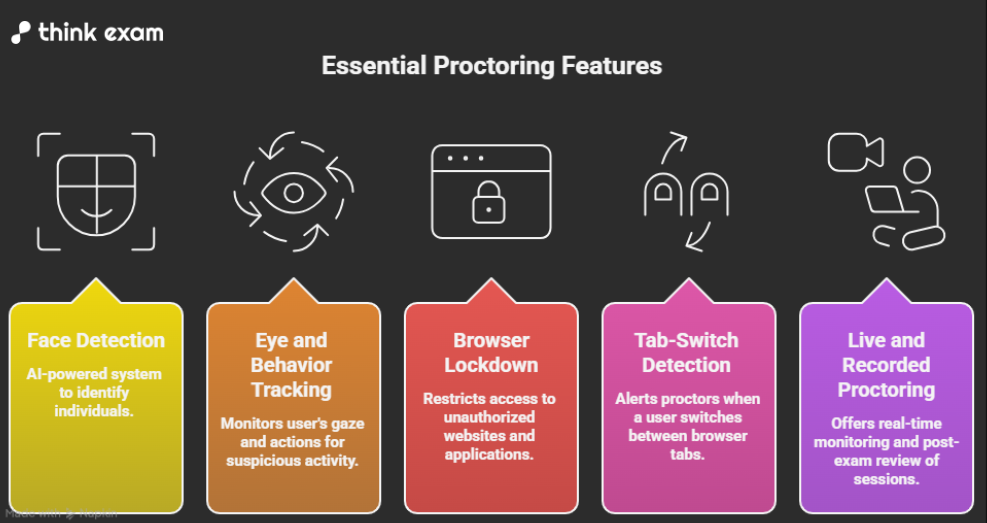
Modern cheating methods use more than one device, AI tools, and help from outside sources. Advanced proctoring systems are made to find and stop these kinds of activities.
If students can easily cheat, test scores are no longer reliable, which hurts your school’s reputation and affects rankings.
5. Analytics and Performance Insights
A CBT platform should not only administer assessments but also deliver actionable insights. One of the best things about CBT platforms is that they can give you detailed information about how well you’re doing. But not every platform gives useful information.
Basic reports like scores and rankings aren’t enough anymore. Institutes need more detailed analytics, such as how well students do on each topic, how long they spend on each question, and how their accuracy changes over time.
Analytics is important because it can turn tests into tools for learning. Each test is no longer just a one-time evaluation; it is now a chance to get better.
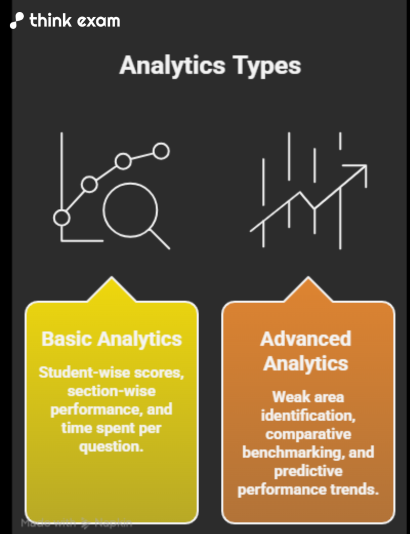
Detailed analytics help teachers figure out how students act and what they need to learn. This makes it possible to give personalized advice and targeted help. Insights based on data turn tests into tools for ongoing learning instead of just one-time evaluations.
6. Scalability and Reliability
The performance of the system during tests is very important. This is important because technical problems during tests not only hurt students, but they also make things harder for your team to run. It can be hard and take a long time to reschedule tests, deal with complaints, and rebuild trust.
What to Evaluate
- Server capacity
- Cloud infrastructure
- Past performance during large-scale tests
A scalable platform can handle more traffic without slowing down or crashing. Technical problems during tests can cause problems, rescheduling, and a loss of trust among students.
7. Customisation and Branding
Your CBT platform should reflect your institute’s identity. This creates a consistent experience for students and reinforces your brand presence. It also adds a level of professionalism that can differentiate your institute from competitors.
Without customisation, students may feel disconnected from the platform, especially if it prominently displays a third-party identity.
Key Features
- White-labeling
- Custom dashboards
- Branded reports
Branding makes all student interactions consistent and makes the school look more professional. A customized platform helps students and parents remember your brand and trust it more.
8. Integration Capabilities
The platform should work seamlessly with your existing systems. Integration with Learning Management Systems, CRM tools, and payment gateways ensures smooth data flow and reduces manual work. It also minimizes the chances of errors caused by duplicate data entry.
When things aren’t integrated, it can cause inefficiencies, more work for administrators, and broken data, all of which can make it harder to make decisions.
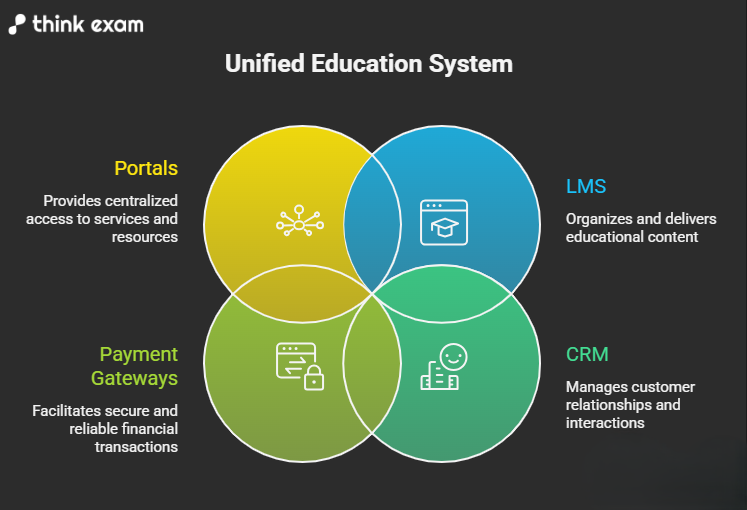
Important Connections
- Learning Management Systems (LMS)
- Tools for CRM
- Gateways for payments
- Portals for students
Integration gets rid of manual tasks and makes sure that data flows smoothly between systems.
- Data Security and Compliance
Protecting student data and exam content is essential. A secure platform should include encryption, secure storage, and controlled access.
Only people who have permission should be able to see sensitive information, and there should be clear rules for keeping data safe.
Security is very important because any breach can hurt your school’s reputation and make students and parents less trusting. It might also have legal consequences in some cases.
Features for security
- Encryption of data
- Safe cloud storage
- Access control based on roles
A secure platform protects sensitive data from being accessed or breached without permission. If your security isn’t up to par, it could hurt your reputation and even get you in trouble with the law.
10. Customer Support and Training
Reliable support makes sure that things run smoothly. If you don’t get enough support, even small problems can become big ones that hurt both operations and students’ experiences.
What to Look For
- Help with onboarding
- Real-time support during exams
- Staff training
Even advanced platforms need help setting up and fixing problems. Quick issue resolution keeps things running smoothly and makes sure that testing goes smoothly.
11. Cost vs Value
When looking at prices, think about the long-term benefits. An inexpensive platform might not have all the features it needs, which can cause problems and extra costs over time.
You should instead look at the platform’s overall value. This includes its features, how reliable it is, how well it can grow, and how it affects student outcomes.
A high-quality platform can help you get better results, make students happier, and, in the end, get more students to sign up.
Things to think about
- Ratio of features to cost
- Ability to grow
- Costs that aren’t obvious
A low-cost platform might not have all the important features, which could cause problems and cost more money later. Putting money into a high-quality platform gives you better results and returns over time.
To sum up the point
Choosing the best computer-based test platform is a strategic choice that involves more than just comparing features. You need to know exactly what your school needs, carefully look at the platform’s features, and think about how it will benefit you in the long run.
The right platform not only makes it easier to take tests, but it also improves learning outcomes, builds trust, and helps businesses grow. By taking into account things like coaching, schools can make a smart choice that benefits both students and administrators by taking into account things like user experience, analytics, security, and reliability.