Taking a Computer-Based Test (CBT Test) can feel intimidating. Even if you know the material perfectly, the digital format introduces a whole new set of challenges. Screen fatigue, ticking digital timers, and unfamiliar interfaces can throw off the most prepared students.
Many test-takers lose valuable marks not because they lack knowledge, but because they stumble over the format. Clicking the wrong button, skipping instructions, or mismanaging time can ruin months of hard work.
Understanding these common pitfalls is the first step toward achieving your target score. By knowing exactly what goes wrong for others, you can create a strategy to stay calm and focused.
Below is a detailed guide on the most frequent errors candidates make during a CBT Test and the practical steps you can take to avoid them.
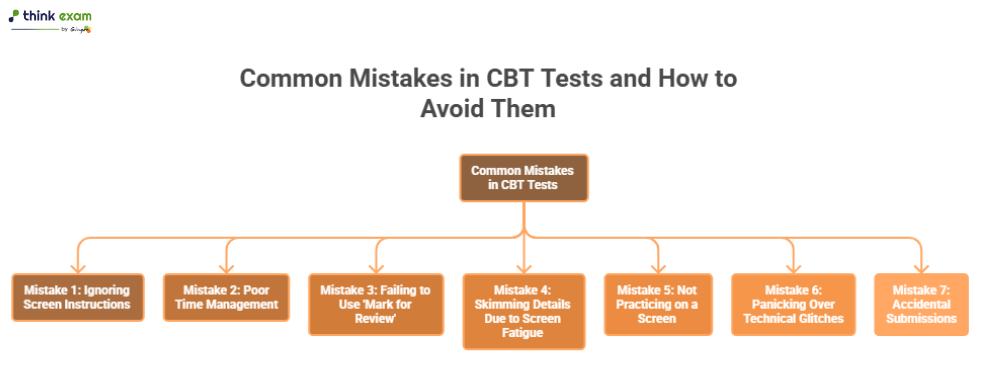
Mistake 1: Ignoring the Screen Instructions
Candidates often rush through the initial screens to start the test immediately. This eagerness usually backfires.
Missing Unique Format Rules
Every testing platform is different. Some tests penalise you for wrong answers, while others do not. Some allow you to go back to previous sections, while others lock you out once you move forward. When you skip the instructions, you risk misunderstanding the fundamental rules of the online exam.
How to Avoid This Mistake Easily
- Read every word: Treat the instruction page as the first question of the exam.
- Note the navigation tools: Look at how to move to the next question, how to flag a question, and how to submit.
- Check the scoring system: Confirm if negative marking applies so you can decide whether guessing is safe.
- Take a deep breath: Use the instruction reading time to calm your nerves before the timer officially starts.
Mistake 2: Poor Time Management
A digital timer counting down in the corner of your screen can cause immense panic. This leads candidates to either rush through questions or freeze on difficult ones.
The Trap of the Difficult Question
When staring at a screen, it is easy to lose track of time. You might spend ten minutes trying to solve a single complex math problem, leaving you with only five minutes to answer ten easy questions at the end of the section.
How to Avoid This Mistake Easily
- Calculate your pace beforehand: Divide the total time by the number of questions. Know exactly how many minutes you can afford to spend on each item.
- Apply the one-minute rule: If you cannot figure out the path to the answer within 60 seconds, move on.
- Hide the timer if possible: If the countdown gives you anxiety and the platform allows it, hide the clock and only check it every 10 or 15 questions.
- Answer easy questions first: Build momentum and secure guaranteed points by tackling the simplest questions immediately.
Mistake 3: Failing to Use the ‘Mark for Review’ Tool
Paper tests allow you to circle hard questions and flip back easily. Computer tests require you to use specific digital tools, which many candidates forget exist.
The Danger of Blind Guessing
Some candidates guess an answer and move on, completely forgetting to return to it later. Others leave it blank and then struggle to find the exact question number again before the time runs out.
How to Avoid This Mistake Easily
- Locate the review button early: Find the ‘Flag’ or ‘Mark for Review’ button during the tutorial phase.
- Flag uncertain answers: If you are torn between two options, pick your best guess, flag the question, and move to the next one.
- Leave blanks only if necessary: If there is no negative marking, never leave a flagged question blank. Select an educated guess just in case you run out of time to review it.
- Allocate review time: Plan to finish the main section with five minutes to spare specifically to revisit your flagged items.
Mistake 4: Skimming Details Due to Screen Fatigue
Reading on a glowing monitor is much harder on the eyes than reading ink on paper. Candidates tend to skim questions to reduce eye strain, which leads to major reading comprehension errors.
Missing Key Modifiers
Test makers love to use words like “NOT,” “EXCEPT,” “ALWAYS,” and “NEVER.” When you skim text on a screen, your brain often skips over these crucial modifiers, causing you to select the exact opposite of the correct answer.
How to Avoid This Mistake Easily
- Read the question twice: Always read the prompt entirely before looking at the multiple-choice options.
- Use your cursor as a guide: Follow the text with your mouse pointer to keep your eyes anchored to the words.
- Blink and rest your eyes: Look away from the screen for three seconds every few questions to reset your focus.
- Use the highlight tool: If the software allows it, highlight critical keywords like “NOT” to keep them visually prominent.
Mistake 5: Not Practicing on a Screen
Studying from physical textbooks is great, but it does not prepare you for the physical environment of a CBT Test.
The Shock of the Digital Interface
If your first time taking a digital test is on exam day, the interface will slow you down. The mental energy spent figuring out how to use the calculator widget takes away from the energy needed to solve the problem.
How to Avoid This Mistake Easily
- Take digital mock tests: Replicate the exact testing conditions at home using a desktop or laptop computer.
- Use a standard mouse: Avoid using a trackpad during practice if the actual test center will use standard computer mice.
- Practice with a digital calculator: Stop using your smartphone calculator. Use an on-screen calculator similar to the one provided in the exam.
- Simulate the environment: Sit at a desk, use a scratchpad for calculations, and do not pause the test for breaks.
Mistake 6: Panicking Over Technical Glitches
Computers freeze. Software crashes. Power outages happen. When an unexpected technical issue occurs, many candidates lose their focus completely.
Breaking Concentration
A frozen screen can cause your heart rate to spike. You might worry that your answers are lost or that the timer is still running while you wait for help. This panic ruins your concentration for the rest of the exam.
How to Avoid This Mistake Easily
- Do not touch the keyboard: If the screen freezes, do not click the mouse repeatedly or hit random keys. This can make the problem worse.
- Raise your hand immediately: Quietly alert the invigilator or proctor without leaving your seat.
- Trust the autosave: Most modern CBT Test platforms save your progress locally or to a server every few seconds. Your data is likely safe.
- Practice mental grounding: While waiting for the technician, close your eyes, take slow breaths, and review the last question in your head to maintain your focus.
Mistake 7: Accidental Submissions
The worst nightmare of any candidate is clicking “Submit Exam” when they only meant to click “Next Section.”
Clumsy Navigation
Testing interfaces can sometimes be poorly designed. The button to finish the test might be located dangerously close to the navigation arrows.
How to Avoid This Mistake Easily
- Keep your mouse still: Only move the mouse when you are actively selecting an answer or navigating.
- Read dialogue boxes carefully: If a pop-up appears asking “Are you sure?”, read it twice before clicking yes.
- Use keyboard shortcuts safely: If the test allows keyboard shortcuts (like pressing ‘Enter’ to go to the next page), make sure you know exactly what they do.
- Review before the final click: Before hitting the ultimate submit button, do a quick visual scan to ensure all questions show as ‘attempted.’
Master the Interface to Master the Exam
Preparing for a computer-based test requires more than just memorising facts. You have to train yourself to operate the digital environment smoothly. By knowing the interface, respecting the timer, reading questions carefully, and managing technical hiccups with a calm mind, you put yourself in the best possible position to succeed.
Treat the computer not as an obstacle but as a tool. Follow the strategies outlined above, incorporate digital mock exams into your weekly study routine, and walk into the testing centre with complete confidence.