
A high-stakes online exam has a simple requirement: the institution needs confidence that the candidate completed the assessment under the conditions that were intended.
That becomes difficult when an exam runs in an ordinary browser.
A standard browser is designed to give users access to the wider internet, multiple tabs, applications, extensions, and other digital resources. An examination environment often needs the opposite.
This is where a secure browser for exams becomes important.
Rather than treating browser security as a separate technical feature, institutions can use a controlled exam environment to restrict unauthorised activity while allowing candidates to focus on the assessment itself.
Why a Normal Browser Creates an Open Environment
When candidates take an exam through a regular browser, the assessment is running inside an environment that was built for general internet use.
Depending on the device and browser configuration, candidates may have access to:
- Multiple tabs
- Other websites
- Search engines
- Browser extensions
- Copy and paste functions
- Screen capture tools
- Other applications
- Communication platforms
Not every available function represents misconduct, but each can create an additional security consideration for a high-stakes assessment.
A secure assessment browser changes the environment by restricting functions that are not required for the examination.
What a Secure Browser Actually Controls
A secure browser is designed to create a more controlled testing environment.
Depending on the platform, an exam browser may restrict activities such as:
- Opening additional websites
- Switching to other applications
- Using unauthorised browser functions
- Copying examination content
- Taking screenshots
- Accessing prohibited system features
The exact controls vary between solutions and operating systems.
The important point is that the browser becomes part of the examination’s security layer rather than simply being the place where questions are displayed.
A Lockdown Browser Adds Another Layer of Control
A lockdown browser is designed specifically to restrict a candidate’s ability to leave the designated examination environment.
For example, a candidate may be able to access the questions and permitted functions but be prevented from freely moving to other applications or websites during the assessment.
This can be particularly relevant when an exam is:
- High-stakes
- Remote
- Certification-related
- Used for selection
- Conducted without a physical test centre
The objective is not to make the candidate’s device unusable. It is to limit access to functions that are not part of the examination.
Secure Browsers and Proctoring Solve Different Problems
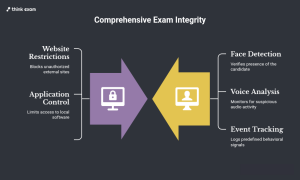
A common misconception is that a secure browser and proctoring perform the same function.
They do not.
A secure browser primarily controls the digital environment.
Proctoring primarily focuses on candidate and session monitoring.
Think of the difference as:
Secure browser: What can the candidate access?
Proctoring: What is happening during the candidate’s exam session?
For example, a secure browser may restrict access to another website. AI remote proctoring may monitor predefined signals such as face presence, multiple faces, voice activity, or other configured events.
Using both can create complementary layers of control.
Why Proctoring Alone May Not Be Enough
Remote proctoring can provide visibility into candidate activity, but visibility and prevention are not the same thing.
If an examination environment allows unrestricted access to other websites or applications, the monitoring system may have to identify and review behaviour after it occurs.
A secure browser can prevent or restrict certain types of activity at the environment level.
This creates a useful distinction:
Proctoring helps detect and review.
Browser controls help restrict.
For high-stakes online exam environments, combining appropriate controls can provide a more structured approach than relying on a single security mechanism.
The Candidate Experience Still Matters
Security controls should not make an examination unnecessarily difficult to access.
Before the exam, candidates may need clear instructions covering:
- Supported devices
- Browser or application requirements
- Camera and microphone permissions
- System compatibility
- Internet requirements
- Permitted resources
- Troubleshooting steps
A pre-exam system check can help identify compatibility problems before the actual assessment begins.
This matters particularly for remote exams, where candidates may be using different devices and network environments.
A secure environment is useful only if legitimate candidates can access it reliably.
Secure Browsers Can Support Different Exam Models
Not every assessment has the same security requirements.
A low-stakes practice test may need basic browser controls.
A professional certification or university final examination may require a stronger combination of:
- Identity verification
- Secure browser controls
- AI-based monitoring
- Session recording
- Human review
- Audit information
A flexible safe exam browser approach allows institutions to select controls according to the assessment rather than applying the same restrictions to every test.
Secure Browsers Also Help Protect Exam Content
Candidate behaviour is only one part of exam security.
Institutions also need to consider the protection of examination content.
If questions can easily be copied, captured, or transferred outside the examination environment, leaked content can affect future assessments.
Browser-level restrictions can therefore support content protection by limiting certain actions during the exam.
For high-stakes assessments, this can be particularly important when question banks are reused across multiple sessions or examination windows.
Security Should Work Across the Entire Exam
A secure browser should not be considered in isolation.
A stronger examination workflow can look like:
Candidate verification → System readiness check → Secure exam environment → Controlled question delivery → AI remote proctoring → Flag and evidence review → Result processing
Each layer addresses a different part of the examination process.
The exact combination will depend on the assessment, candidate population, risk level, and institutional requirements.
Don’t Treat Every Alert as Proof of Misconduct
Technology can identify events, but context still matters.
For example, a monitoring system may flag unusual movement, a change in screen focus, or another predefined event. That does not automatically explain why the event occurred.
Institutions should therefore establish clear review procedures.
A useful model is:
Detection → Evidence → Review → Decision
This keeps automated technology in its appropriate role while allowing authorised human reviewers to consider the context before taking action.
The Real Value of a Secure Browser
The purpose of a secure browser for exams is not simply to block websites.
Its larger role is to create a defined digital environment in which an examination can take place with fewer uncontrolled variables.
For high-stakes online assessments, that environment can work alongside identity verification, proctoring, question security, and human review.
The result is a more layered approach:
Control the environment. Monitor the session. Review the evidence.
That is more useful than expecting any single technology to solve every examination-security challenge.