Creating quizzes manually can take significant time, especially when educators, trainers, recruiters, and assessment teams need multiple question sets for different topics, difficulty levels, or audiences.
An online quiz builder simplifies this process by allowing users to create, organize, publish, and manage digital quizzes from one platform. Modern solutions can also support AI-assisted question generation, multiple question formats, automated assessment workflows, and performance analysis.
For organizations looking to reduce repetitive quiz-creation work, Think Originate by Think Exam provides AI-assisted question generation along with tools for building and managing online assessments.
This guide explains what an online quiz builder is, how it works, what features to look for, and how Think Originate can support quiz and question creation workflows.
What Is an Online Quiz Builder?
An online quiz builder is software that allows educators, trainers, recruiters, and organizations to create and manage quizzes digitally.
Instead of creating question papers manually, users can create questions, organize them into assessments, configure scoring, and deliver quizzes online.
Depending on the platform, an online quiz builder may support:
- Multiple-choice questions
- True or false questions
- Fill-in-the-blank questions
- Short-answer questions
- Question banks
- Automated scoring
- Difficulty settings
- Time limits
- Performance reports
- AI-assisted question generation
- Question editing and regeneration
- Online assessment management
The main purpose is to make quiz creation more structured, repeatable, and easier to manage.
How Does an Online Quiz Builder Work?
The basic workflow is straightforward:
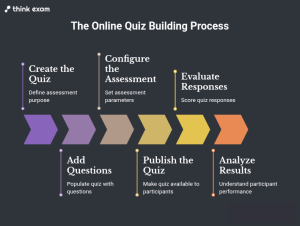
Create → Add Questions → Configure → Publish → Assess → Analyze
1. Create the Quiz
Start by defining the purpose of the assessment, such as:
- Classroom practice
- Employee training
- Skill evaluation
- Recruitment screening
- Certification
- Knowledge checks
- Competitive exam preparation
2. Add Questions
Questions can be created manually, imported from existing question banks, or generated with AI where the platform supports it.
3. Configure the Assessment
Depending on the platform, administrators can configure question types, difficulty, marks, timing, language, and other assessment settings.
4. Publish the Quiz
Once the questions and settings are ready, the assessment can be made available to the intended participants.
5. Evaluate Responses
Objective questions can be evaluated automatically when answer keys and scoring rules are configured.
6. Analyze Results
Performance data can help educators and assessment teams understand scores, question-level performance, and areas where participants may need additional support.
Why Are Online Quiz Builders Becoming Important?
The need for digital assessments has expanded across education, corporate learning, recruitment, and professional training.
An online quiz builder can help address several common challenges in traditional quiz creation.
Faster Question Preparation
Manual question creation requires research, formatting, reviewing, and organizing questions. AI-assisted tools can reduce some of this repetitive work.
Easier Assessment Management
Digital quizzes can be created and managed from a centralized environment instead of maintaining separate paper files or spreadsheets.
Consistent Assessment Structure
Templates, question banks, predefined scoring rules, and reusable assessment settings can help teams maintain consistency.
Flexible Question Formats
Different learning objectives require different question types. A modern quiz platform should support more than one format.
Better Performance Visibility
Digital assessments can provide structured data that helps teachers, trainers, and organizations review participant performance.
What Features Should You Look for in an Online Quiz Builder?
Choosing a quiz platform should start with your actual assessment requirements.
Here are the key features to consider.
1. AI-Assisted Question Generation
AI can help create questions from existing learning content instead of requiring every question to be written manually.
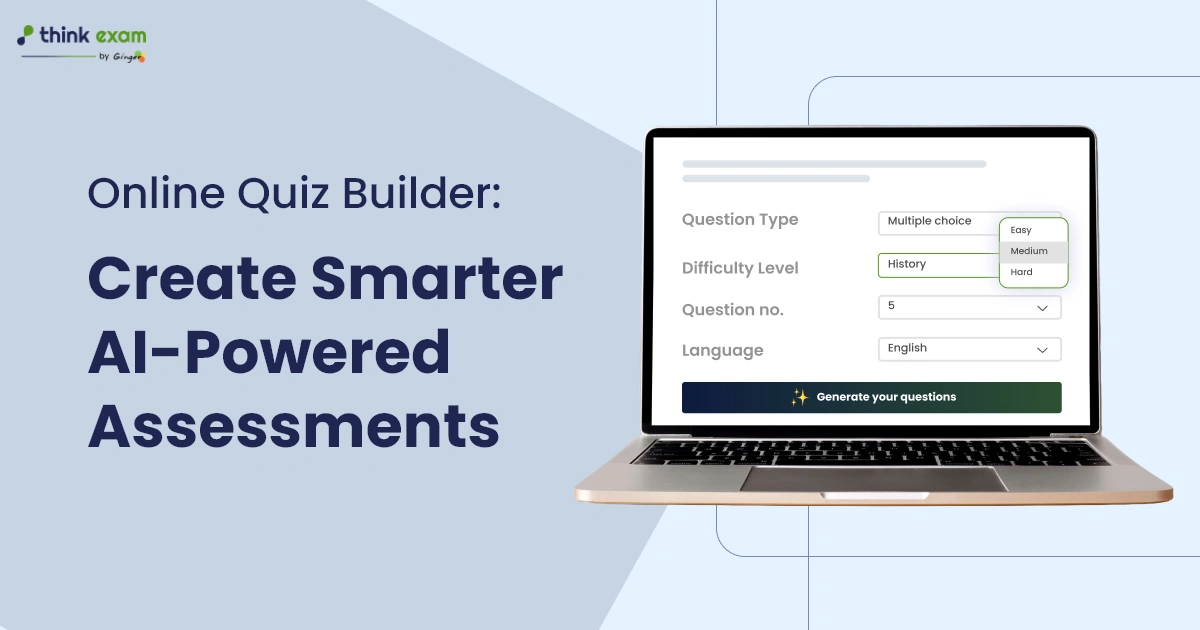
For example, Think Originate allows users to upload a PDF or DOCX model document and use it as the basis for AI-generated questions. Users can specify the subject, topic, question type, difficulty, number of questions, number of options, and preferred language.
2. Multiple Question Types
A useful quiz builder should support different question formats for different assessment objectives.
Think Originate’s documented question-generation workflow supports:
- Multiple choice
- True or false
- Fill in the blanks
- Short answer
This allows users to create assessments beyond simple MCQ-based quizzes.
3. Question Bank Management
A question bank makes it easier to organize questions according to subjects, topics, or other categories.
This becomes particularly useful when an organization regularly creates assessments for different groups.
4. Difficulty Controls
Different participants may require different levels of assessment difficulty.
Difficulty settings can help assessment creators build quizzes appropriate for beginners, intermediate learners, or advanced participants.
5. Editing and Regeneration
AI-generated questions should not be treated as automatically perfect.
Human review remains important.
Think Originate allows generated questions to be edited, regenerated, tagged, and managed after generation. This supports a workflow where AI assists content creation while the assessment creator maintains editorial control.
6. Scoring and Assessment Controls
Depending on the assessment requirements, users may need to configure marks, negative marking, or other scoring rules.
Think Originate’s documented AI-generation workflow includes options for right marks, negative marks, option marks, and question explanations.
7. Reporting and Analytics
Creating a quiz is only one part of assessment.
The ability to review results and performance data helps organizations understand whether participants have achieved the intended learning or evaluation objectives.
8. Security
For higher-stakes assessments, quiz creation should ideally work alongside appropriate assessment security measures.
This is particularly important when quizzes form part of recruitment tests, certifications, academic examinations, or other controlled assessments.
How Does AI Change Online Quiz Creation?
One of the biggest developments in digital quiz creation is the use of AI to assist with question generation.
Instead of starting with a blank page, an assessment creator can provide source material and define the desired question parameters.
For example:
Source content → AI generation → Human review → Editing → Question bank → Assessment
This workflow can reduce repetitive work while keeping the assessment creator involved in the final quality check.
A Practical Example
Suppose a trainer has a 15-page training document about cybersecurity.
Instead of manually creating every question, the trainer can provide the source material to an AI-assisted question-generation system.
The trainer can then specify:
- Subject
- Topic
- Question type
- Difficulty
- Number of questions
- Number of options
- Language
- Scoring requirements
The generated questions can then be reviewed and edited before being used in an assessment.
Think Originate’s documented workflow follows this type of model-based question-generation approach.
Think Originate as an AI-Powered Online Quiz Builder
Think Originate is Think Exam’s AI-assisted quiz and question-generation solution.
Its documented workflow allows administrators to upload PDF or DOCX content as a model and generate questions from that content. The system supports several question formats and configuration options, while generated questions can be reviewed and edited before use.
This makes the platform relevant for teams that want to combine AI-assisted question creation with human review.
The workflow can be summarized as:
Upload content → Select subject and topic → Choose question type → Set difficulty → Generate → Review → Edit → Save
This approach is particularly useful when assessment teams need to create multiple question sets from existing educational or training content.
Who Can Use an Online Quiz Builder?
An online quiz builder can support different types of organizations.
Schools and Colleges
Teachers can create:
- Chapter quizzes
- Subject tests
- Practice tests
- Knowledge checks
- Revision assessments
Universities
Higher education institutions can use online quizzes for course assessments, internal evaluations, practice tests, and knowledge checks.
Corporate Training Teams
L&D teams can create quizzes to check employee understanding after training programs.
For example, a company could conduct a short knowledge test after a compliance, product, cybersecurity, or onboarding session.
Recruitment Teams
Recruiters can use online assessments to evaluate areas such as:
- Aptitude
- Technical knowledge
- Domain skills
- Job-related knowledge
Coaching and Training Institutes
Training providers can create topic-based tests, practice assessments, and revision quizzes for learners.
Online Quiz Builder vs Traditional Quiz Creation
| Traditional Quiz Creation | Online Quiz Builder |
|---|---|
| Questions created manually | Questions can be created manually or with AI assistance |
| Paper or separate documents | Centralized digital workflow |
| Manual organization | Question bank management |
| Manual distribution | Digital delivery |
| Manual evaluation for many objective tests | Automated evaluation where supported |
| Limited performance data | Digital reporting and analytics |
| Difficult to reuse content | Questions can be stored and reused |
| More repetitive administrative work | More structured workflow |
The actual benefits depend on the features, implementation, assessment type, and quality of the content being used.
Online Quiz Builder vs Online Assessment Platform
These terms are related, but they are not always interchangeable.
An online quiz builder primarily focuses on creating and managing quizzes.
An online assessment platform can cover a broader assessment lifecycle, including:
- Test creation
- Question banks
- Candidate management
- Assessment delivery
- Proctoring
- Security
- Evaluation
- Reporting
- Analytics
- Integrations
Therefore, a quiz builder can be one component of a broader online assessment ecosystem.
For organizations conducting high-stakes assessments, it is worth evaluating the complete assessment workflow rather than selecting a platform based only on its quiz-creation features.
How to Create Better Online Quizzes
Technology can make quiz creation faster, but the quality of the assessment still depends on how it is designed.
Start With the Learning or Assessment Objective
Before creating questions, define what you want to measure.
For example:
Knowledge: Can the participant remember the concept?
Understanding: Can the participant explain or interpret it?
Application: Can the participant use the concept in a practical situation?
This helps prevent quizzes from becoming simple collections of factual questions.
Use Different Question Types
Where appropriate, combine question formats instead of relying on one type for every objective.
Review AI-Generated Questions
AI can accelerate question creation, but subject-matter review remains important.
Check:
- Accuracy
- Relevance
- Difficulty
- Grammar
- Correct answer
- Distractor quality
- Duplicate questions
- Alignment with the source material
Avoid Ambiguous Questions
A good question should have a clear objective and a defensible answer.
Avoid wording that allows multiple reasonable interpretations.
Balance Difficulty
A useful assessment generally needs an appropriate mixture of difficulty levels rather than making every question extremely easy or difficult.
AI-Generated Questions Still Need Human Review
AI can make question creation more efficient, but automation should not remove human judgment from assessment design.
A strong workflow is:
AI assistance + subject expertise + human review = better assessment control
The person responsible for the assessment should verify whether generated questions accurately represent the source material and intended learning objective.
This is especially important for professional certification, recruitment, academic testing, and other assessments where question quality can affect participant outcomes.
What Should You Check Before Choosing an Online Quiz Builder?
Before selecting a platform, ask these questions:
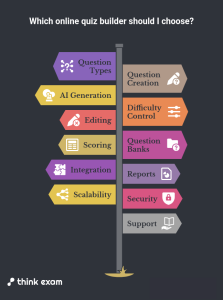
- Does it support the question types I need?
- Can I create or import questions easily?
- Does it provide AI-assisted question generation?
- Can I control difficulty?
- Can questions be edited after generation?
- Does it support question banks?
- Can I configure scoring and marks?
- Does it provide useful reports?
- Can it integrate with my existing assessment workflow?
- Does it provide appropriate security for my assessment type?
- Can it scale with my number of learners or candidates?
- Does the vendor provide clear documentation and support?
These questions help organizations compare platforms based on actual requirements instead of marketing claims.
The Future of Online Quiz Builders
Online quiz builders are moving beyond simple question-and-answer functionality.
The next stage of digital assessment is likely to focus on:
AI-Assisted Content Creation
AI can help assessment teams generate initial question sets from existing content.
More Personalized Assessments
Assessment systems can increasingly support different question sets, difficulty levels, and learning paths.
Better Assessment Analytics
Organizations can use assessment data to identify performance patterns and areas requiring additional training.
Scenario-Based Testing
Instead of testing only memorization, assessments can increasingly focus on how participants apply knowledge to realistic situations.
Integrated Assessment Workflows
Quiz creation, assessment delivery, security, evaluation, and reporting can become part of a connected assessment environment.
The important point is that technology should support better assessment design, not simply create more questions.
Why Think Originate Can Be Useful for Online Quiz Creation
Think Originate brings AI-assisted question generation into the quiz and assessment workflow.
Its documented process allows users to upload PDF or DOCX source material, define subjects and topics, select question formats and difficulty, generate questions, and then review or edit the output. Questions can also be saved, tagged, regenerated, or downloaded in supported formats.
This makes it particularly relevant for organizations that already have learning or training content and want to turn that content into structured digital questions more efficiently.
Conclusion
An online quiz builder can simplify the process of creating and managing digital assessments for education, training, recruitment, and professional learning.
The most useful platforms are not simply those that generate questions quickly. They should provide a practical workflow for creating relevant questions, reviewing content, configuring assessments, managing questions, evaluating responses, and understanding results.
AI can make this process more efficient, but human expertise remains important for checking question quality, accuracy, relevance, and alignment with assessment objectives.
For organizations exploring AI-assisted quiz creation, Think Originate by Think Exam provides a workflow that combines source-content-based question generation with options for configuration, editing, regeneration, and question management.
The right online quiz builder ultimately depends on your assessment goals, audience, content, security requirements, and existing technology environment.