Remote testing has seen a massive 300% increase in sophisticated cheating methods over the past three years. Basic proctoring tools can no longer keep up with students using hidden earpieces, secondary devices, and virtual machines.
By 2026, the next generation of online assessment tools will completely transform academic integrity. We are moving from basic tab-blocking to intelligent, AI-driven behaviour analysis.
For educators, IT administrators, and testing coordinators, understanding this shift is vital to maintaining the credibility of standardised tests.
Here is what you will learn in this guide:
- How the modern secure assessment browser implements AI.
- Why edge computing solves persistent privacy concerns.
- Actionable steps your institution can take to prepare for this shift.
The Evolution of the Exam Browser
Early testing tools were blunt instruments. A traditional lockdown browser simply froze a student’s screen and restricted keyboard shortcuts. These legacy systems stop basic copy-pasting but fail to address off-screen cheating.
By 2026, the secure browser for exams will operate differently. Software developers are shifting focus from locking down devices to actively mapping the students’ testing environment. By integrating artificial intelligence, the software can differentiate between a student pausing to think and a student reading hidden notes.
3 Innovative Features of a 2026 Secure Assessment Browser
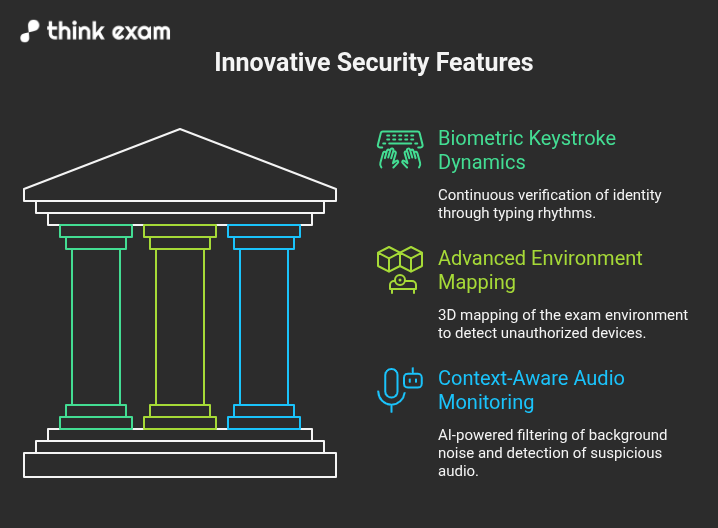
To outsmart modern cheating methods, the next generation of testing software relies on seamless, intelligent features. A modern secure assessment browser uses three key technologies to guarantee academic integrity.
1. Biometric Keystroke Dynamics
Passwords and facial recognition only prove who logged in. They do not prove who is taking the test.
- Continuous Verification: Future software analyses typing rhythms to verify the test-taker’s identity continuously.
- Unique Cadence: Every person has a specific rhythm when striking keys.
- Actionable Security: By measuring the milliseconds between keystrokes, the secure assessment browser ensures the person who started the exam is the exact same person finishing it.
2. Advanced Environment Mapping
A safe exam browser in 2026 will use standard webcams to create a 3D map of the student’s room.
- Spatial Awareness: This technology flags unauthorised devices, secondary screens, or other people entering the space.
- Automated Detection: It accomplishes this automatically, removing the need for a human proctor to constantly watch video feeds to spot physical movements.
3. Context-Aware Audio Monitoring
Basic microphone recording often triggers false flags for harmless sounds.
- AI Filtering: The future secure browser for exams uses AI to filter out harmless background noise like a passing siren or a barking dog.
- Targeted Alerts: It specifically isolates and flags suspicious audio, such as whispered answers or frequencies from hidden earpieces.
Solving the Privacy Dilemma in Online Testing
Recording a student’s bedroom and sending that footage to a remote cloud server presents major data privacy risks. The 2026 safe exam browser solves this dilemma using edge computing.
- Local Processing: Edge computing allows the lockdown browser to process video and audio data directly on the student’s machine rather than transmitting it over the internet.
- Instant Deletion: Because the AI analyses the data in real-time on the device, highly sensitive biometric data is instantly deleted after the session.
- Alert-Only Transmission: The software only sends an alert to the institution if cheating is detected, protecting student privacy while maintaining security standards.
Preparing Your Institution for the Future
Schools, universities, and certification bodies must audit their digital testing infrastructure now. Relying on an outdated lockdown browser leaves your institution vulnerable to both modern cheating methods and privacy complaints.
Take these steps to prepare:
- Audit Current Tools: Evaluate if your current software relies on outdated screen-locking or cloud-based video storage.
- Form a Task Force: Create an internal team dedicated to academic integrity technology to evaluate upcoming software vendors.
- Run Pilot Programs: Test new edge-computing secure browsers with small student cohorts to gauge effectiveness and ease of use.
- Review Privacy Laws: Ensure the new exam browser aligns with regional data privacy laws.
Transitioning to a Cheat-Proof Future
The technology behind secure assessments is moving from restrictive to intelligent. By adopting AI-driven behavior analysis and privacy-first edge computing, institutions can finally stop sophisticated academic dishonesty.
IT directors and academic deans must act now. Request product roadmaps from your current software providers to see how they plan to meet 2026 standards. Start building a fairer, more secure testing environment for your students today.