Online exams make it easier for universities, educational institutions and online course providers to assess learners remotely. However, maintaining exam integrity becomes more challenging when students take tests from different locations, devices and network environments.
This is where AI exam proctoring software can help. It uses technology such as webcam monitoring, identity verification and automated activity detection to support the supervision of online examinations. Depending on the solution, it may also provide recorded sessions, incident reports and tools for reviewing potentially suspicious activity.
Choosing the right solution requires more than comparing features. Institutions need to consider exam security, student privacy, accessibility, system compatibility, scalability and the experience of both learners and administrators.
This guide explains how to evaluate online exam proctoring software, which features matter most, and what to check before selecting a solution for your online courses.
What Is AI Exam Proctoring Software?
AI exam proctoring software helps monitor online examinations and identify activity that may require further review. Depending on the platform, it can use webcam feeds, screen monitoring, identity checks, browser controls and automated analysis to support remote exam supervision.
Unlike traditional in-person invigilation, remote proctoring allows students to take exams from different locations while exam administrators manage the process online.
There are several approaches to online exam monitoring:
- AI-based proctoring: Uses automated analysis to flag activity that may require attention.
- Live online proctoring: A human proctor supervises students remotely during an examination.
- Recorded proctoring: Exam sessions are recorded for review, either during or after the test.
- Hybrid proctoring: Combines automated monitoring with human supervision or review.
The appropriate approach depends on the exam’s importance, the number of candidates, institutional policies and the level of supervision required.
AI monitoring does not establish that misconduct has occurred simply because an activity is flagged. Alerts should be interpreted in context and reviewed according to a fair, clearly defined process.
Why Online Courses Need Exam Proctoring Software
Online courses allow learners to study and complete assessments from different locations. However, institutions still need reliable methods to protect assessment integrity and ensure that results reflect each learner’s knowledge and skills.
Online exam proctoring software can help address several challenges.
Maintaining exam integrity
Remote assessments can create opportunities for unauthorized assistance, access to prohibited resources or impersonation. Appropriate identity checks, monitoring and exam rules can help discourage misconduct and identify incidents for review.
Supporting remote learners
Students may take assessments from home, a campus or another approved location. Remote proctoring can support these arrangements without requiring every student to attend a physical examination centre.
Managing large numbers of candidates
Institutions offering multiple online courses may need to conduct assessments across different subjects, schedules and locations. Scalable exam proctoring software can help administrators manage exam sessions and review incidents more consistently.
Improving the review process
Depending on the platform, administrators may be able to review recorded sessions, automated flags and incident reports. This can support investigations and help institutions apply their examination policies more consistently.
Protecting the value of assessments
Reliable examination procedures help institutions maintain confidence in assessment results. Proctoring is one part of this process, alongside clear exam rules, suitable question design, identity verification and appropriate review procedures.
Key Features to Look for in AI Exam Proctoring Software
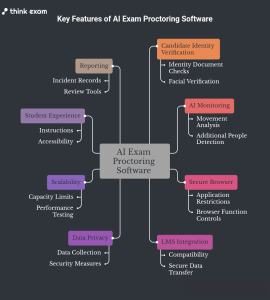
Not every proctoring platform offers the same capabilities. Before choosing a solution, assess the following features against your institution’s actual requirements.
1. Candidate identity verification
Identity verification helps establish whether the person taking the examination matches the approved candidate.
Depending on the platform, verification methods may include identity document checks, facial verification or other authentication procedures.
When evaluating this feature, ask:
- Which identity verification methods are supported?
- Can candidates complete verification easily before the exam begins?
- What happens when a verification check fails?
- Is there an alternative process for legitimate candidates who encounter technical or accessibility issues?
Identity checks should be proportionate to the assessment and designed to avoid unnecessary barriers for genuine candidates.
2. AI monitoring and suspicious activity detection
AI proctoring software may analyse selected activities during an examination and flag events that appear inconsistent with exam rules.
Depending on the solution, these events could include repeated movement away from the screen, additional people appearing in the camera view or attempts to access restricted resources.
However, such signals do not automatically prove cheating. Looking away from a screen, for example, can have an innocent explanation.
Ask vendors how alerts are generated, what evidence administrators can review, and whether human review is available before an incident leads to an adverse decision.
3. Secure browser and exam environment controls
Some online exams require restrictions on access to other applications, websites or browser functions. A secure browser or lockdown capability may help enforce these rules where supported.
Before selecting a platform, confirm which restrictions are available, which operating systems and devices are supported, and whether the controls suit the assessment format.
No browser restriction can prevent every possible form of misconduct. Institutions should combine technical controls with appropriate exam design and clearly communicated rules.
4. LMS integration and compatibility
Learning management system (LMS) integration can simplify assessment administration by connecting the proctoring workflow with an institution’s existing learning environment.
Before making a decision, confirm:
- Compatibility with your current LMS.
- How students access proctored assessments.
- Whether candidate information can be transferred securely.
- How exam schedules, results and reports are handled.
- Whether integration requires additional configuration or licensing.
Do not assume that every vendor supports every LMS or integration method. Request a demonstration using your actual environment.
5. Data privacy and security
AI proctoring and data privacy may involve personal information, webcam recordings, identity documents or other examination data. Institutions should understand how this information is collected, processed, stored and accessed.
Review the following:
- What data is collected during an examination?
- How long are recordings and incident reports retained?
- Who can access candidate information?
- Can data be deleted according to institutional policy?
- What security measures protect stored and transmitted information?
- What consent, disclosure and legal requirements apply to your institution?
Requirements vary by jurisdiction and institution. Do not rely on a general claim of GDPR, FERPA or other legal compliance without verifying the specific product documentation and your applicable obligations.
6. Scalability and performance
A platform that works for a small test may need additional evaluation before it is used for thousands of candidates.
Consider whether the software can support your expected number of simultaneous test takers, multiple courses, different examination schedules and peak-period demand.
Ask the vendor about capacity limits, performance testing, incident handling and the support available during high-volume examinations.
If your institution conducts large-scale assessments, request a pilot that reflects realistic candidate numbers and network conditions.
7. Student experience and accessibility
A proctored examination should be secure without creating unnecessary difficulties for genuine students.
Review the instructions shown before the exam, system compatibility checks, identity verification process and availability of technical assistance.
Also assess accessibility requirements, assistive technology compatibility and the procedure for approved accommodations.
A clear onboarding process can reduce confusion and help students understand what is monitored, which resources are prohibited and how to obtain support.
8. Reporting and incident review
Proctoring software should help administrators understand what happened during an examination without requiring them to treat every automated alert as a violation.
Look for clear incident records, relevant timestamps, review tools and configurable reporting options where required.
Ask whether authorised staff can examine the evidence, document decisions and follow a consistent process for handling disputed incidents.
How to Choose the Best Online Exam Proctoring Software
Once you understand the main features, use a structured evaluation process rather than choosing a platform based on marketing claims alone.
Step 1: Define your examination requirements
Start by identifying who will take the exam, how many candidates are expected, whether the assessment is high-stakes and what level of supervision is required.
A practice quiz may need fewer controls than a final university examination or a professional certification assessment.
Step 2: Shortlist suitable vendors
Look for online exam proctoring software that matches your technical environment, exam format, privacy requirements and support expectations.
Review product documentation and ask vendors to demonstrate the capabilities that matter most to your institution.
Step 3: Compare essential features
Create a checklist covering identity verification, AI monitoring, secure browser controls, LMS integration, reporting, accessibility and privacy.
Distinguish between features that are essential and those that would be useful but are not necessary for your assessments.
Step 4: Test the candidate experience
Run a pilot with representative students and devices before deploying the platform widely.
Test login, identity verification, browser compatibility, webcam and microphone permissions, network interruptions and the process for resuming an examination when permitted.
Record the problems encountered and confirm how the vendor addresses them.
Step 5: Review privacy and security documentation
Ask for the vendor’s data processing documentation, retention policies, access controls and relevant security information.
Confirm that the proposed use of recordings and candidate data fits your institution’s requirements and applicable laws.
Step 6: Evaluate pricing and ongoing support
Compare the total cost rather than relying only on the advertised starting price.
Check candidate-based charges, examination limits, integration fees, storage costs, implementation requirements and support arrangements.
Also clarify how urgent issues are handled during a live examination.
Step 7: Make a decision based on evidence
Use the results of the pilot, vendor responses and your evaluation checklist to make the final decision.
A suitable platform should meet your essential requirements, fit your budget and provide a reliable experience for candidates and administrators.
Common Mistakes to Avoid When Choosing Proctoring Software
Even a feature-rich solution may not suit an institution’s requirements. Avoid these common mistakes during the selection process.
Choosing based on price alone: A lower initial cost may not include the integrations, support or capacity your institution needs.
Assuming AI can eliminate all cheating: Automated monitoring can flag potential issues, but it cannot guarantee that every form of misconduct will be detected or prevented.
Ignoring false positives: Normal behaviour, technical problems and accessibility needs can sometimes trigger alerts. Ask how the software handles these situations and supports human review.
Overlooking student privacy: Understand what data is collected and how it is used before deploying monitoring tools.
Skipping a pilot test: A product demonstration may not reveal the difficulties students experience on their own devices or networks.
Ignoring technical support: Unresolved login, compatibility or connectivity problems can disrupt examinations. Establish support expectations before implementation.
Selecting without considering future needs: Your candidate numbers, assessment formats and integration requirements may change. Choose a solution that can accommodate realistic future demand.
How Think Exam Fits Into Your Proctoring Evaluation
Think Exam provides assessment technology for organisations that conduct online examinations. Its Think Proctor offering is relevant to institutions evaluating remote proctoring as part of their online examination process.
When assessing Think Exam or any other provider, identify the capabilities your institution needs and verify them through product documentation and a demonstration.
Consider identity verification, monitoring workflows, incident review, device compatibility, reporting, data handling and the support available for your intended use case.
For universities and other institutions conducting remote assessments, the selection process should focus on whether the solution meets academic integrity requirements while maintaining a fair and accessible examination experience.
The right choice is the platform that fits your assessment requirements, technical environment, privacy obligations and budget, rather than simply the one with the longest feature list.
Final Thoughts
Selecting the right AI exam proctoring software involves balancing exam integrity, privacy, accessibility, compatibility and cost. A clear evaluation process helps institutions compare options based on their actual needs instead of relying on broad product claims.
Start with your examination requirements, test the shortlisted solutions in realistic conditions and verify how each platform handles candidate data, technical issues and suspicious activity.
With the right evaluation process, institutions can make more informed decisions about online exam proctoring software and create a more consistent, secure and accessible remote assessment experience.